Unplugged AI: Turning Project Read’s Decodable Passages into Decodable Books
Want the power of AI without the screen time? First Grade Teacher Beth shares how to turn Decodable Generator stories into printable books for your students.
 Beth MikkelsenFirst Grade Teacher
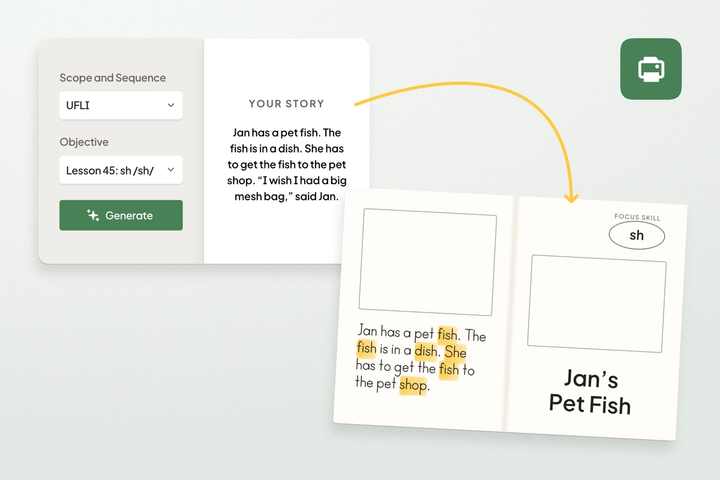
Education today stands at a crossroads. At our disposal, we have the incredible power of AI that has already revolutionized how teachers plan, create, and provide feedback. Yet developments in research and public sentiment have begun to swing away from excessive use of screens, particularly in early elementary. This leaves educators with the question: how do we harness the power of AI without placing young children in front of a screen all day? Enter: Project Read’s Decodable Generator.
Project Read’s Decodable Generator allows teachers to easily create decodable stories personalized to a student's phonics needs and interests. With just a few clicks, it is easy to reformat those generated decodable passages into printable paper books to get into students' hands. This allows teachers to use AI to help improve instruction without students having to be in front of a screen. Below you will find step-by-step directions on how to make these awesome stories into student-friendly books.
First, Create a Template
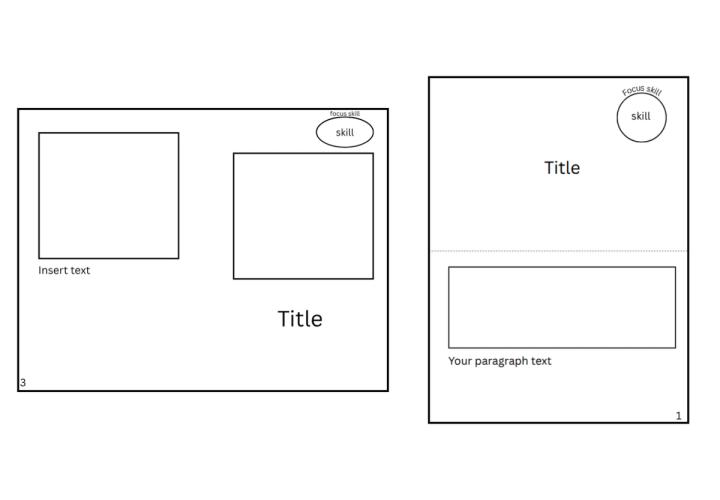
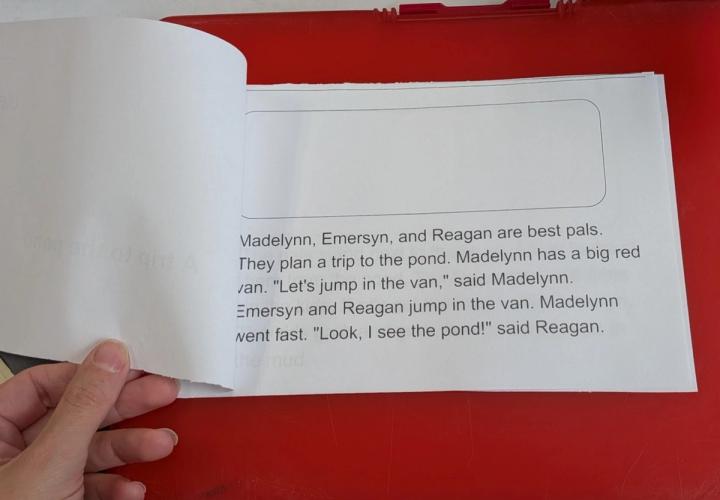
Use Canva or Google Slides to create a template you can copy and paste your decodable text into. This can be done by just adding text boxes to pages for where you would like the text to go. You can also add empty boxes to allow students a place to draw a picture.
Here are 4 examples of templates:
- Single Page (Foldable) Canva Template (opens in a new tab)
- Single Page (Foldable) Google Slides Template (opens in a new tab)
- Multi Page (Staple) Canva Template (opens in a new tab)
- Multi Page (Staple) Google Slides Template (opens in a new tab)
Next, Generate a Decodable Passage
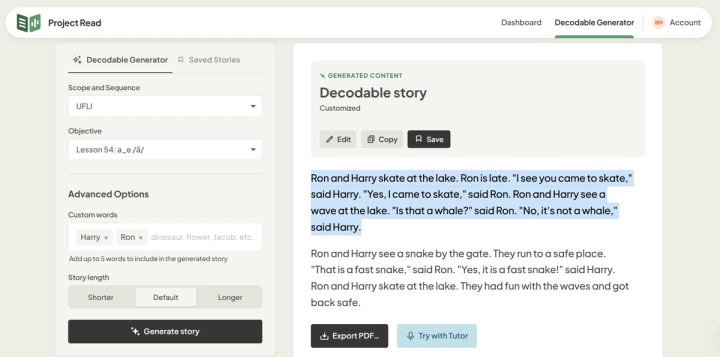
Using Project Read’s Decodable Generator, create a text that matches your students' phonics needs. With the Pro version, you can even add custom words. These are great for adding the students’ names to the book or vocabulary for something they are interested in. As with all AI tools, always make sure to double-check the text.
Then, Copy and Paste the Text into the Template
Select the text you want to be on the first “page” of your book and copy it. Then go into your template and paste it in the spot you would like it. Feel free to adjust the text style and size to best meet the needs of your students. Repeat for all the following pages.
Finally, Print and Assemble Your Book
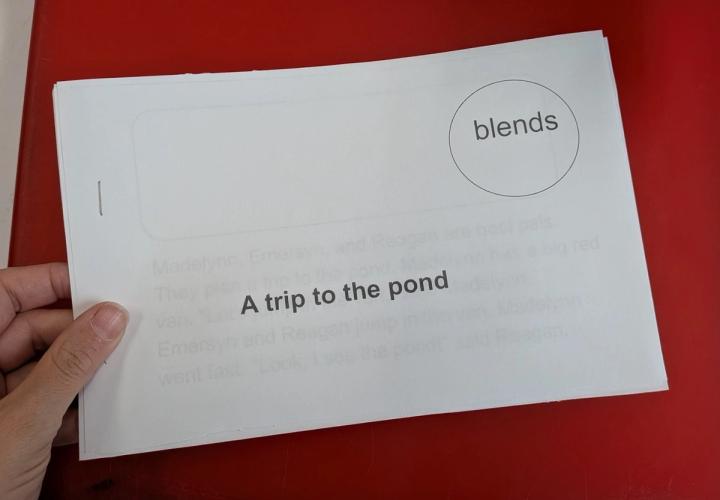
Once you have all your text in the place you would like it, print your book. Then staple the pages together in the correct order. Now you have a custom decodable book for your student(s). Need a small group set? Just print more copies!
Ideas for How to Use These Books
Due to Project Read’s ability to personalize passages not only for phonics skills but also for a reader’s interests, these books provide an engaging way for students to practice the necessary phonics skills. Once teachers have grouped their students based on the needed phonics skill practice, it is easy for a teacher to make books that fit each group's needs. Teachers can simply add the names of students in the group to the decodable generator and create books to support each group. All they have to do is print out multiple copies of the books to be used during small group instruction.
During small group instruction, teachers can use these small paper books to work on phonics skills by having students highlight the specific skill that appears frequently in the book. Unlike other manufactured decodable books that a school might buy, printed books allow students to be able to highlight phonics patterns right in the text. This encourages them to initially slow down and locate the specific phonics sounds in the text. Then, upon rereading, the highlighting will cue students into the phonics sound. This particularly works well with digraphs or vowel teams, as students can physically highlight/circle the two letters that represent one sound together.
The purely phonics- and text-based nature of these books also provides students with an excellent opportunity to improve their comprehension skills, as they are not relying on a given picture to provide meaning. Students can be encouraged to draw out a picture that represents what is going on in the story to monitor for their meaning. Project Read also has a Comprehension Question Generator that allows you to copy and paste your text into it, and it will provide you with comprehension questions to ask. These can be easily added to the end of the book, along with a place for students to answer, as another way to check for understanding.
Closing Thoughts
In a world of image generators and “AI slop,” it is easy to write off websites that use AI as just more noise or useless information. However, at the heart of Project Read is not an effort to replace the teacher, but a tool to help the teacher focus on what teaching really means. It means tailoring instruction to meet the individual needs of each student and providing them with meaningful practice to solidify a needed skill. Project Read’s Decodable Generator allows teachers to do that in an efficient and specific way by providing targeted text that matches a student's needs and interests. It allows teachers the opportunity to use the technology of today in a tangible, meaningful way to meet the students' needs. It is a tool for the teacher but could never replace the teacher. By turning these decodable passages into printable books, we allow students to have hands-on practice that matches their needs, skills, and interests. It allows students to spend less time on screens and more time working through and building knowledge of the letter-sound correspondences. The physical nature of these books also allows students to build their executive function and concentration as they remain focused on reading a printed text without the additional distractions associated with screen usage. Although it seems so simple, the ability to print an unlimited number of personalized decodable texts that align specifically with a program’s scope and sequence is perhaps the best bridge between what technology can be and what it should be.
Resources
- Project Read’s Decodable Generator
- Project Read’s Comprehension Question Generator
- Bring Project Read to your School or District (opens in a new tab)
- Single Page (Foldable) Canva Template (opens in a new tab)
- Single Page (Foldable) Google Slides Template (opens in a new tab)
- Multi Page (Staple) Canva Template (opens in a new tab)
- Multi Page (Staple) Google Slides Template (opens in a new tab)