What Successful UFLI Portal Implementation Looks Like
Five things the schools getting the most out of the UFLI Portal get right, in the words of the administrators, coaches, and specialists who shared their learnings.
 Lisa ZerkelHead of Customer Success
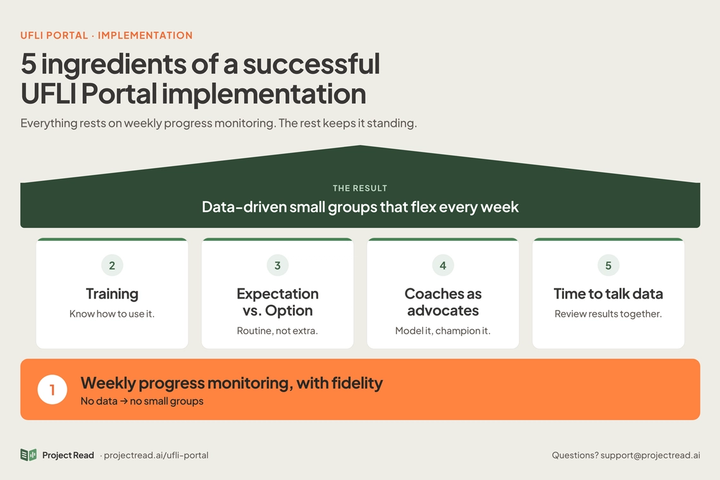
The UFLI Portal can turn Friday’s progress monitoring into next week’s small groups and lesson plans in seconds, but after more than a year of working alongside schools and districts, we’ve learned that the tool is only as strong as the routine around it.
The schools getting the most out of the Portal don’t necessarily have the flashiest rollout. They get five things right. Below, we break down each one, with a few words from the administrators, coaches, and specialists who have generously shared their learnings.
1. Progress monitoring actually happens, every week
Everything in the Portal starts with a UFLI progress monitoring check. No assessment means no data to enter, and no data means no small groups. That’s why implementation fidelity comes first.
Dr. Holly Lane, Director of the University of Florida Literacy Institute, has pointed to progress monitoring and small group support as the most common barriers to implementing UFLI with fidelity. The Portal takes most of the work out of small group planning, but only if the weekly check happens first.
When it does, the payoff is immediate:
“Teachers in our district love the detailed lesson plans that are available after entering assessment data.”
“Real time data that teachers are using to drive small group differentiated instruction.”
What it looks like: every teacher gives the progress monitoring check at the end of each week, and results are scanned or entered before next week’s instruction begins.
2. Teachers know the “how”
A teacher who knows the nuts and bolts will use the Portal. A teacher who isn’t sure how will fall back to manual methods. A small investment in training early on pays off all year.
You don’t have to figure it out alone:
- Watch the pre-recorded training video for a full walkthrough of the Portal.
- Try the clickable demo for a 60-second overview.
- Read the UFLI Small Group Portal User Guide for step-by-step answers.
- Get in touch by reaching out to your Customer Success Manager or at support@projectread.ai. We’re happy to brainstorm a training option that fits your organization.
3. Make entering data each week an expectation
When the Portal is one optional tool among many, usage tends to be uneven: a few enthusiastic teachers dive in while others never log on. Districts that make the Portal part of how UFLI is done, rather than an add-on, see it become routine:
“Schools that had the best implementation made it a part of their system rather than just an extra option.”
“We required all teachers to use [the portal] for weekly progress monitoring data collection and small-group development. I would routinely go in to check for data collection and to find trends.”
What it looks like: a clear weekly timeline for entering data, Portal use as a standard practice in your UFLI implementation plan, and an implementation point person who regularly tracks data and supports teachers with usage.
4. Coaches and content experts lead the way
Instructional coaches, reading specialists and literacy coordinators are often a teacher’s first call when something feels unfamiliar. Many of the most enthusiastic responses we received came from people in exactly these roles. When they champion the Portal, model it in classrooms and help teachers incorporate the recommendations, adoption follows:
“Our content leader for ELA led morning meetings 1x a month to share updates with our teachers and field any questions.”
“Our reading specialists were instrumental in our implementation… and were vital to our district’s success.”
What it looks like: coaches are local experts, support teachers along the way, and share quick wins with staff.
5. Teams make time to talk about the data
Data entered and never discussed is a missed opportunity. The strongest implementations protect regular time, in PLCs or grade-level meetings, to look at progress monitoring results together. That’s where teachers spot patterns across classrooms and decide what to adjust next.
“We meet weekly for PLC conversations and incorporated the data… into those discussions.”
“We used coaches and our PLC structures to ensure teachers were using their data to inform small group instruction. Targeting instruction ensured students were not missing concepts… Our building level coaches are vital in this support.”
We heard that need. The Cumulative Data View now shows student progress over time, which makes it a natural anchor for team conversations.
A simple agenda for your next meeting:
- Which concepts did most students struggle with this week?
- Which students keep showing up in the same small group?
- What will we change in instruction next week?
Putting it all together
Together, the five ingredients turn the Portal from a tool teachers could use into the engine behind small group instruction every week.
If your district or school is missing one or two, that’s normal, especially early in the year. Pick one to strengthen this month. And if you’d like help, reach out at support@projectread.ai. We’d love to brainstorm what successful implementation could look like for your team.
- Bring Project Read to your School or District